Angular added .env support quietly

TLDR
Tired of rebuilding Angular for every environment change? I found a robust way to add runtime.envsupport by using SSR. The server intercepts, extracts the necessary variables, and passes the configuration dynamically to the client.
link to the repo — https://github.com/vasilenlyubomirov-glitch/angular-runtime-configuration-example
Introduction
Recently I picked Angular back up after a few years immersed in the React/Next.js and Vue.js world.
Something I came to love in those frameworks is the simple .env pattern. The variables inside the .env file seamlessly become part of the Node.js process.env environment. This means that in a Docker Container or a Kubernetes Cluster, as long as you inject the right environment configuration, the app picks it up automatically. This key principle means you only have to build one single Docker container and deploy it anywhere—ECS, Fargate, Google Kubernetes Cluster, EKS, or anywhere else. You build the container once and you are good to go.
In Angular, the default way is still to have different application build commands based on environment files like environment.local.ts, environment.dev.ts, and environment.prod.ts. This is a huge downside because having your secrets or configuration directly inside the source of the application is a disaster waiting to happen.
Some people mitigate this by having the so-called config.json inside the assets directory. However, this is still not 12-factor compliant, meaning you run the same build command but must programmatically pick the right config.json from a vault storagebeforehand—like it's 1996!
Thankfully, the Angular architecture has evolved.
Right now, you can add Server-Side Rendering (SSR) to your Angular application and Inject Transfer State with the environment configuration directly from the Node process to the frontend. This means you can freely use true runtime variables everywhere in the application.
The transition is simpler than you might think, as you just need SSR for your app.component (the root), and everything else—like the router-outlet for the rest of your application—can live safely inside an isPlatformBrowser check.
It’s still not as clean as NextJS where I can decide whether a component is CSR only or not, but it’s a massive step forward.
1. The Core Problem: Build Time vs. Run Time 🛑
In a standard CSR Angular app, variables defined in environment.ts are static. When you run ng build, those values are compiled and permanently baked into the JavaScript bundle.
With SSR, you need true runtime configuration.
- The server needs access to Node environment variables (
process.env.API_URL) to execute server-side logic and pre-fetch data. - The client (browser) also needs that same
API_URLwhen the app hydrates and begins client-side navigation.
If the client doesn’t get the variable from the server, it will default or be undefined, leading to errors or inconsistent behavior.
2. The Architectural Solution: Transfer State 💡
Transfer State is Angular’s elegant solution to avoid redundant network requests and to share data — like configuration — between the server and the client.
Think of it as the server leaving a secure, perfectly formatted sticky note inside the HTML before passing it to the browser.
The Flow🏃♂️
npx ng add@angular/ssrfor an existing project ORng new angular-runtime-configuration-example --ssr- Definitions (
app.config.tokens.ts): We define the shape of our config and the key used to tag the data. - Server Writes the Note(
app.config.server.ts): On the Node server, we readprocess.envand useTransferStateto write the data, tagged with our key, using a functional provider. - Client Reads (
app.config.ts): On the browser, we use the same key and auseFactoryprovider to synchronously pull the config out of the Transfer State store embedded in the HTML. - Consumption (
env.service.ts): We create a service that injects the configuration value, making it available to any component or service.
3. Implementation: The Functional, Unified Approach
Here are the files required to make this work, following modern Angular 19 standalone component standards.
File 1: src/app/app.config.tokens.ts (The Contract)
Create this file on the same level as app.component.ts. This defines the data structure and the unique key, ensuring type safety and consistency across both platforms.
import { makeStateKey } from '@angular/core';
export interface AppConfig {
  apiUrl: string;
  environment: 'development' | 'production';
  featureFlag: boolean;
}
// This key matches the data between Server and Client
export const APP_CONFIG_KEY = makeStateKey<AppConfig>('APP_CONFIG');
File 2: src/app/app.config.server.ts (The Server Writer)
This configuration file runs on the Node.js server. We use provideAppInitializer to execute code that reads process.env and writes the configuration into the TransferState store before the server renders.
import { mergeApplicationConfig, ApplicationConfig, TransferState, inject, provideAppInitializer } from '@angular/core';
import { provideServerRendering } from '@angular/platform-server';
import { appConfig } from './app.config';
import { APP_CONFIG_KEY, AppConfig } from './app.config.tokens';
const serverConfig: ApplicationConfig = {
  providers: [
    provideServerRendering(),

    // Use provideAppInitializer to execute code on the server immediately
    provideAppInitializer(() => {
      const transferState = inject(TransferState);

      // 1. Capture Node.js Environment Variables (available only here)
      const envConfig: AppConfig = {
        apiUrl: process.env['API_URL'] || 'http://localhost:3000',
        environment: (process.env['NODE_ENV'] as any) || 'development',
        featureFlag: process.env['ENABLE_FEATURE'] === 'true',
      };
      // 2. Write the config object to TransferState using the shared key
      transferState.set(APP_CONFIG_KEY, envConfig);
    }),
  ],
};
// Merge client config with server-specific config
export const config = mergeApplicationConfig(appConfig, serverConfig);
File 3: src/app/app.config.ts (The Client Reader)
This is your main application configuration. We define an InjectionToken (APP_ENV) and use a useFactory provider that reads the value synchronously from the Transfer State store on the client side.
import { ApplicationConfig, provideZoneChangeDetection, inject, InjectionToken } from '@angular/core';
import { provideRouter } from '@angular/router';
import { provideClientHydration, withEventReplay } from '@angular/platform-browser';
import { TransferState } from '@angular/core';
import { routes } from './app.routes';
import { APP_CONFIG_KEY, AppConfig } from './app.config.tokens';
// 1. Create an Injection Token for components to use
export const APP_ENV = new InjectionToken<AppConfig>('APP_ENV');
export const appConfig: ApplicationConfig = {
  providers: [
    provideZoneChangeDetection({ eventCoalescing: true }),
    provideRouter(routes),
    provideClientHydration(withEventReplay()),
    // 2. The Provider Logic: This runs on the client and reads the state
    {
      provide: APP_ENV,
      useFactory: () => {
        const transferState = inject(TransferState);

        // Define a hardcoded client-side default/fallback value
        const defaultConfig: AppConfig = {
          apiUrl: 'http://localhost:4200/api',
          environment: 'development',
          featureFlag: false
        };

        // Retrieve the config using the key. If the server successfully
        // transferred the state, we get the runtime value. Otherwise, we use the default.
        return transferState.get(APP_CONFIG_KEY, defaultConfig);
      }
    }
  ]
};
File 4: src/app/env.service.ts (The Consumer)
Any component or service can now inject this service and access the configuration, which is guaranteed to hold the runtime value passed via Transfer State.
import { inject, Injectable } from '@angular/core';
import { BehaviorSubject } from 'rxjs';
import { APP_ENV } from './app.config'; // The token we set up in app.config.ts
import { AppConfig } from './app.config.tokens';

@Injectable({ providedIn: 'root' })
export class EnvService {
  // 1. Inject the value using the token (works synchronously on both Server and Client)
  private readonly initialEnv: AppConfig = inject(APP_ENV);
  // 2. Wrap it in a BehaviorSubject for reactive consumption (optional, but good practice)
  public env$ = new BehaviorSubject<AppConfig>(this.initialEnv);
  get snapshot(): AppConfig {
    return this.env$.getValue();
  }
  // Example consumption in a component:
  // private env = inject(EnvService);
  // private apiUrl = this.env.snapshot.apiUrl;
}
File 5: src/app/app.component.ts (In Action)
Any component or service can now inject this service and access the configuration, which is guaranteed to hold the runtime value passed via Transfer State.
import { inject, Injectable } from '@angular/core';
import { BehaviorSubject } from 'rxjs';
import { APP_ENV } from './app.config'; // The token we set up in app.config.ts
import { AppConfig } from './app.config.tokens';
import {Component, inject, Inject, PLATFORM_ID} from '@angular/core';
import { AppConfig } from './app.config.tokens';
import {APP_ENV} from './app.config';
import {isPlatformBrowser} from '@angular/common';
import {RouterOutlet} from '@angular/router';
@Component({
  selector: 'app-root',
  standalone: true,
  imports: [
    RouterOutlet
  ],
  template: `
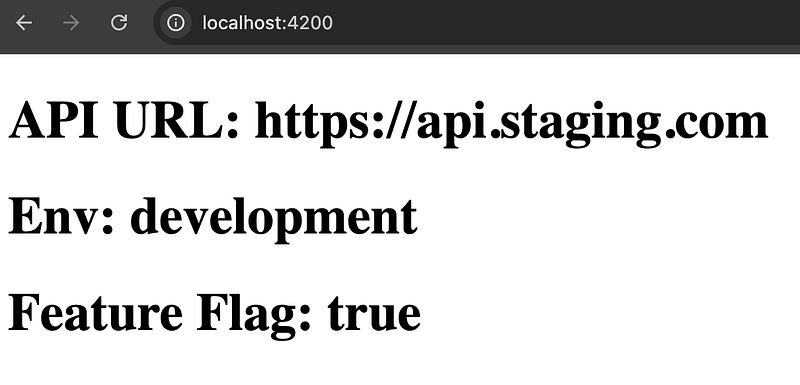
    <h1>API URL: {{ apiUrl }}</h1>
    <h1>Env: {{ environment }}</h1>
    <h1>Feature Flag: {{ featureFlag }}</h1>
    // this step is to migrate your app to support SSR at your own pace
    @if (isBrowser) {
      <router-outlet></router-outlet>
    }
  `
})
export class AppComponent {
  private platformId = inject(PLATFORM_ID);
  isBrowser = isPlatformBrowser(this.platformId);

  private envService = inject(EnvService);
  apiUrl: string = '';
  environment: string = '';
  featureFlag: string = '';

  constructor() {
    this.apiUrl = this.envService.snapshot.apiUrl;
    this.environment = this.envService.snapshot.environment;
    this.featureFlag = this.envService.snapshot.featureFlag;
  }
}
4. Running The Application🚀
API_URL=”https://api.staging.com" NODE_ENV=development ENABLE_FEATURE=”true” ng serveThe end result
5. The Deployment Impact: Your Dockerfile Just Changed 🚀
This is the most critical shift in adopting SSR. You are no longer serving static files; you are running a Node.js web server.
Your previous setup likely used a simple two-stage Dockerfile: build the Angular app, and then copy the static /browser output to a lightweight server like Nginx.
Since the server is responsible for rendering the initial HTML and managing the runtime configuration, you must now execute the server bundle generated by Angular.
The key takeaway is that the CMD of your container is no longer a static file server; it's the Node runtime executing your server-side application. This allows your app.config.server.ts file to access process.env and securely bridge the runtime variables to the client via Transfer State.
Conclusion: Architectural Simplicity Leads to Runtime Flexibility ✅
The Transfer State pattern is an architectural cornerstone of modern Angular SSR. It allows you to completely separate your build process (which is static) from your deployment configuration (which is dynamic).
- Build Once: Your
ng buildoutput is constant, regardless of the environment. - Configure Anywhere: You simply set your system variables in your deployment environment (Docker, Kubernetes, etc.) before running the Node server.
By using the server to read the runtime environment and then passing that configuration to the client via Transfer State, you achieve a robust and flexible solution that truly embraces the power of server-side rendering.